Common Drone Frequency Mistakes and How to Avoid
Published: 7 Sep 2025
A lot of drone pilots make the same mistake without realizing it, they fly without considering the drone remote control frequency they are using. This can cause interference, weak signals, or even complete loss of control in mid-air. The issue is that many assume one frequency fits all situations, but that’s not true. Environments, obstacles, and flying distances all affect performance. By learning how frequencies like 2.4 GHz and 5.8 GHz work, you can avoid these costly errors. In this article, we’ll highlight common frequency mistakes and show you how to pick the right one for safer, smoother flying.
Why Frequency Choice Matters
Signals are the lifeline of your drone because they keep the controller and aircraft connected at all times. If the signal is weak or disrupted, even for a few seconds, you risk losing control in mid-air. Many pilots overlook this and think any frequency will work, but that’s not true. Ignoring frequency selection can lead to interference, unstable flight, or even a sudden crash. For example, a pilot flying near a busy neighborhood with lots of Wi-Fi signals might experience random dropouts if they stick to 2.4 GHz without checking the environment. Another case is flying far out over open fields on 5.8 GHz, only to see the drone lose range much sooner than expected. These situations show that choosing the right frequency isn’t optional—it’s essential for safe and smooth flying.
Breaking Down the Main Frequencies
When it comes to drone signal networks, most pilots work with 2.4 GHz and 5.8 GHz. Each has its strengths and limits, so knowing the difference helps you pick the right one for your flight.
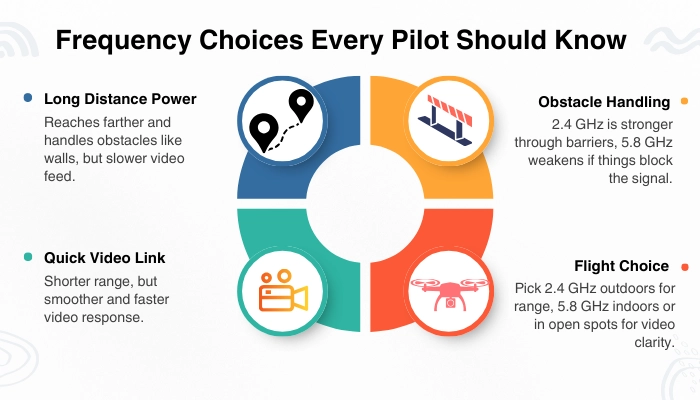
2.4 GHz : This band is known for its longer range and better performance when flying through obstacles like trees or walls. The trade-off is a slower response time compared to 5.8 GHz, which can affect video feed speed. It’s best for long-distance outdoor flights.
5.8 GHz : This frequency gives you a faster response and smoother video but works over a shorter range. It also struggles more when obstacles block the signal. It’s perfect for short, open-area flights where real-time video is important.
Interference Problems Pilots Overlook
Many drone pilots don’t realize that invisible signals in the air can interfere with their drone’s frequency. These “crowded airwaves” create weak connections and sudden dropouts. Knowing the common sources helps you avoid unexpected problems.
Wi-Fi and Bluetooth devices : Most homes and public areas are packed with Wi-Fi routers, smartphones, and Bluetooth gadgets. These all use the same 2.4 GHz band that many drones rely on. If you fly too close, your drone signal may compete with them and weaken.
Power lines and electrical equipment : High-voltage lines and large electrical machines give off strong electromagnetic fields. These can disrupt both 2.4 GHz and 5.8 GHz signals, leading to unstable control. Always keep your drone at a safe distance from power lines.
Busy urban zones : Cities are full of wireless signals from cell towers, traffic cameras, and even smart devices. This overload of frequencies makes the air crowded, causing more signal drops compared to rural or open areas.
How to spot and avoid interference zones : Before flying, look around your environment. If you see many routers, towers, or power lines, chances are the airwaves are crowded. Test your signal strength on the ground before takeoff and choose the frequency with the least interference.
Range vs. Speed Trade-Off
When choosing a drone remote control frequency, you are really deciding between flying farther or enjoying faster, smoother controls. Each frequency has strengths and limits.
Longer Distance (2.4 GHz) : This frequency is designed for flying farther. It can cover large areas and is less likely to drop signals in open outdoor spaces. Perfect for exploring fields or flying long routes.
Faster Response (5.8 GHz) : This frequency reacts quicker to your controller’s commands. It makes the drone feel smoother and more responsive, which is ideal for racing, tricks, or capturing steady video.
Obstacle Weakness (5.8 GHz) : While fast, the 5.8 GHz signal struggles with walls, trees, or heavy interference. It’s best in open areas or short-range flights where you don’t need to go far.
Choosing Wisely : If your goal is distance and exploration, go with 2.4 GHz. If you want sharp controls and smoother video at close range, 5.8 GHz is the smarter choice.
Obstacles That Affect Frequencies
Your drone’s signal strength depends a lot on what’s around you. Obstacles can block or weaken the frequency, causing lag or even loss of control.
Trees and Foliage : Thick trees or heavy greenery absorb signals, especially higher frequencies like 5.8 GHz. Flying low through wooded areas often causes sudden interference.
Walls and Buildings : Concrete, steel, and glass can block signals almost completely. Urban flying can be tricky because tall buildings create blind spots between your drone and the controller.
Open vs. Urban : Open fields give you the cleanest line-of-sight, which is why your drone flies farther and smoother there. In crowded cities, signals bounce around, making interference more likely.
Line-of-Sight Tips : Always keep your drone visible and avoid flying behind big obstacles. Standing on higher ground or keeping the antenna pointed correctly also improves signal strength.
Not Switching Frequencies When Needed
Many drone pilots stick to one frequency all the time, but that can limit performance and even cause problems. Knowing when to switch makes your flights safer and smoother.
Common Mistake : Many beginners assume one frequency works everywhere. But flying long distances on 5.8 GHz or racing on 2.4 GHz often leads to weak signals or lag.
Better Situations : Switching to 2.4 GHz helps when you need long range, like mapping or exploring wide areas. Moving to 5.8 GHz gives faster response when filming up close or racing.
Safe Switching : Some drones allow mid-flight switching, but it must be done carefully. Always read your drone’s manual, test in an open area, and make sure the drone’s return-to-home (RTH) is set in case of a drop.
How to Choose the Right Frequency for Your Flight
The right frequency depends on where and how you plan to fly. Use these simple points to guide your choice every time.
Short vs. Long Flights : For short, close flights, 5.8 GHz gives smoother controls and better video. For long-distance flights, 2.4 GHz is more reliable because it travels farther.
Indoor vs. Outdoor : Indoors, walls and obstacles make 5.8 GHz less effective. Outdoors, open areas allow 2.4 GHz to stretch farther without losing signal.
Quick Checklist :
Want distance? Use 2.4 GHz.
Need a fast response? Use 5.8 GHz.
Flying indoors? Stick to short-range 2.4 GHz.
Flying outdoors? Choose based on distance vs. speed needs.
Guidelines to Avoid Frequency Mistakes
A few small habits can save your drone from crashes and weak signals. Follow these tips to make better frequency choices every time you fly.
Check Surroundings : Look for Wi-Fi routers, power lines, or crowded areas before takeoff. These can cause interference and weaken your signal.
Scan for Interference : Use apps or your drone’s built-in tools to check which frequency band is clearer. This helps you pick the safest option before flying.
Update Firmware : Keeping your controller and drone updated ensures they handle frequencies better. Updates often fix bugs and improve signal stability.
Practice Both Frequencies : Test 2.4 GHz and 5.8 GHz in different conditions. Getting hands-on experience builds confidence and helps you know which one works best.
Protecting Your Drone from Signal Loss
Losing signals mid-flight can be stressful and risky. By preparing in advance, you can keep control or let your drone safely return if the connection drops.
Set Up RTH : Always enable the Return-to-Home (RTH) feature before flying. If the signal cuts out, your drone will automatically fly back to its starting point instead of crashing.
Strong Connection : Keep antennas pointed correctly and avoid flying behind large obstacles. Staying within line-of-sight helps maintain a steady link between the controller and drone.
Pre-Flight Check : Scan the area and test your chosen frequency before takeoff. A quick check prevents surprises in the air and helps you fly with confidence.
Final Thoughts
Choosing the right drone remote control frequency is the difference between smooth, safe flights and frustrating signal problems. Remember, 2.4 GHz works best for longer distances, while 5.8 GHz gives you quicker, sharper controls at shorter ranges. The key is to match your frequency to the conditions you’re flying in. Make it a habit to check for interference, keep your gear updated, and practice with both frequencies so you’re ready for any situation.